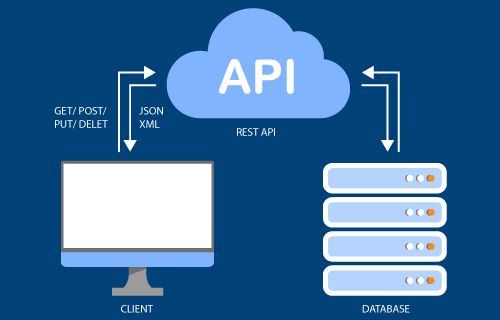
Accessing data, triggering automated processes Depending on your requirements, you can either read or write to data records from other systems. For example, data can be read, updated or deleted in both directions and processes can be designed more efficiently with automations.
Extend the CRM release 8.15 as required Thanks to its flexibility and compatibility, the REST API is suitable for working with a wide variety of data records and use cases. It therefore offers you unlimited expansion options for our CRM software.
Integration with proALPHA ERP A comprehensive interface has been created to synchronize companies and contacts.
Duplicate search in the WEB With CRM release 8.15, you can actively search for duplicates to clean up your data.
Further new features in the web and app For optimizations in Service, BusinessMail and the CRM app goMobile Pro.
Outlook-centric working on the web:Work conveniently and save time without switching between programs. Mails can be sent to addresses from the CRM via Outlook. In addition, appointments can be assigned to contacts from the CRM, including group appointments. For classified Outlook users, appointments are synchronized between the CRM system and Office 365.
AI integration: The new CRM assistant helps to write texts faster via the integration of OpenAI in all RichText fields. Selected text can be edited at the touch of a button. Free instructions to the AI are also possible for text editing.
UX/UI customizations: New optimizations make work easier & lead to the goal faster, such as the new filter and color functions in the task widget.
Project management enhancements: Less extensive projects can now also be edited, existing project management functions are now optimized for smaller projects.
The Microsoft Windows platforms that are also supported by HCL Notes are supported as operating systems.
Released for the Domino Server:
HCL Domino Server 11.0.1 FP8
HCL Domino Server 12.0.2 FP4
HCL Domino Server 14.0 FP1
Exception: AIX and IBM i (former names AS/400 or eServer iSeries or System i5) are not supported as servers.
Release 8.14 Notes Client
Release 8.14 Server
Released for HCL Notes 11.0 to HCL Notes up to 12.0.2 FP2 also 64-bit. Note:Released for the HCL Domino Server from Domino 11 to version 14. When using the HCL Domino 14 Server / Domino 14 Client, the GI 8.14 Interim Update #1 must be installed.
The Microsoft Windows platforms that are also supported by HCL Notes are supported as operating systems.
If the Domino Designer client is required, at least Domino Designer version 11 must be used.
Released for the HCL Domino Server from Domino 11 to version 12.0.2 FP2. Note: Released for the HCL Domino Server from Domino 11 to version 14. When using the HCL Domino 14 Server / Domino 14 Client, the GI 8.14 Interim Update #1 must be installed.
Exception: AIX and IBM i (former names AS/400 or eServer iSeries or System i5) are not supported as servers.
Release 8.13 Notes Client
Release 8.13 Server
HCL Notes 11.0 to HCL Notes 12.0.2 (32-bit) NOTE: Released for the HCL Domino Server from Domino 11 to version 14. When using the HCL Domino 14 Server / Domino 14 Client, the GI 8.13 Interim Update #3 must be installed.
The Microsoft Windows platforms that are also supported by HCL Notes are supported as operating systems.
If the Domino Designer client is required, at least Domino Designer version 11 must be used.
Released for Domino servers from version 11 to version 12.0.2.
Exception: AIX and IBM i (former names AS/400 or eServer iSeries or System i5) are not supported as servers.
Release 8.12 Notes Client
Release 8.12 Server
IBM Notes 8.5.1 (Basic & Standard Client) to HCL Notes 12.0.2 (32-bit) NOTE: The new 64-bit client of HCL Notes 12.0.2 cannot be used for working with GEDYS IntraWare 8!
The Microsoft Windows platforms that are also supported by HCL Notes are supported as operating systems.
If the Domino Designer client is required, at least Domino Designer version 9.0.1 FP10 must be used.
Released for Domino servers from version 8.5.1 to version 12.0.0.
Exception: AIX and IBM i (former names AS/400 or eServer iSeries or System i5) are not supported as servers.
Release 8.11 Notes Client
Release 8.11 Server
IBM Notes 8.5.1 (Basic & Standard Client) up to HCL Notes 11.0.1 FP1
The Microsoft Windows platforms that are also supported by HCL Notes are supported as operating systems.
If the Domino Designer client is required, at least Domino Designer version 9.0.1 FP10 must be used.
Released for Domino servers from version 8.5.1 to version 11.0.1 FP1.
Exception: AIX and IBM i (former names AS/400 or eServer iSeries or System i5) are not supported as servers.
Release 8.15 Webbrowser
Release 8.15 Server
Firefox version 128 for Windows or macOS Ventura
Google Chrome version 126 for Windows
Microsoft Edge Chromium version 126 for Windows
Safari 17 for macOS Sonoma
Restrictions under iPAD OS
no import
no export
no client-side PDF generation
no creation of Office documents
Restrictions under Mac OS
no WebDAV
no client-side PDF generation
Released for the Doino Server:
HCL Domino Server 11.0.1 FP8
HCL Domino Server 12.0.2 FP4
HCL Domino Server 14.0 FP1
Exception: AIX and IBM i (former names AS/400 or eServer iSeries or System i5) are not supported as servers.
Release 8.14 Webbrowser
Release 8.14 Server
Firefox version 121 for Windows or macOS Ventura
Google Chrome version 120 for Windows
Microsoft Edge Chromium version 120 for Windows
Safari 17 for macOS Sonoma
Restrictions under iPAD OS
no import
no export
no client-side PDF generation
no creation of Office documents
Restrictions under Mac OS
no WebDAV
no client-side PDF generation
Released for HCL Domino Server from Domino 11 to version 12.0.1 plus 12.0.2 FP2 (not 12.0.2 without FP). Note: Released for the HCL Domino Server from Domino 11 to version 14. When using the HCL Domino 14 Server / Domino 14 Client, the GI 8.14 Interim Update #1 must be installed.
Exception: AIX and IBM i (former names AS/400 or eServer iSeries or System i5) are not supported as servers.
Release 8.13 Webbrowser
Release 8.13 Server
Firefox version 110 for Windows or macOS Ventura
Google Chrome version 110 for Windows
Microsoft Edge Chromium version 110 for Windows
Safari 16 for macOS Ventura
Restrictions under iPAD OS
no import
no export
no client-side PDF generation
no creation of Office documents
Restrictions under Mac OS
no WebDAV
no client-side PDF generation
Released for Domino servers from version 11 to version 12.0.1 (not 12.0.2).
Exception: AIX and IBM i (former names AS/400 or eServer iSeries or System i5) are not supported as servers.
Release 8.12 Webbrowser
Release 8.12 Server
Firefox version 108 for Windows or Mac OS X
Google Chrome version 108 for Windows
Microsoft Edge Chromium version 108 for Windows
Safari 14 for Mac OS X, iOS14
Restrictions under iPAD OS
No import
no export
No client-side PDF generation
No creation of Office documents
Restrictions under Mac OS
no WebDAV
no client-side PDF generation
Released for Domino servers from version 9.0.1 FP8 to version 12.0.0 (64-bit in each case).
Exception: AIX and IBM i (former names AS/400 or eServer iSeries or System i5) are not supported as servers.
Release 8.11 Web browser
Release 8.11 Server
Firefox version 82 for Windows or Mac OS X
Google Chrome version 86 for Windows
Microsoft Edge Chromium version 86 for Windows
Safari 14 for Mac OS X, iOS14
Restrictions under iOS
No import
no export
No client-side PDF generation
No creation of Office documents
Restrictions under Mac OS X
no WebDAV
no client-side PDF generation
Released for Domino servers from version 9.0.1 FP8 to version 11.0.1 FP1 (each 64Bit).
Exception: AIX and IBM i (former names AS/400 or eServer iSeries or System i5) are not supported as servers.
Release 8.15 Mobile devices
Release 8.15 Server
The current system requirements can be found in the Apple App Store or Google Play Store.
Released for the Domino Server:
HCL Domino Server 11.0.1 FP8
HCL Domino Server 12.0.2 FP4
HCL Domino Server 14.0 FP1
Dojo Framework in version 1.9.x (tested with 1.9.9)
Exception: AIX and IBM i (former names AS/400 or eServer iSeries or System i5) are not supported as servers.
The JavaScript Dojo Framework must be available in version 1.9.9 on the Domino server.
Release 8.14 Mobile devices
Release 8.14 Server
The current system requirements can be found in the Apple App Store or Google Play Store.
Released for the HCL Domino Server from Domino 11 to version 12.0.1 plus 12.0.2 FP2 (not 12.0.2 without FP),
Dojo Framework in version 1.9.x (tested with 1.9.9)
Note: Released for the HCL Domino Server from Domino 11 to version 14. When using the HCL Domino 14 Server / Domino 14 Clients, the GI 8.14 Interim Update #1 must be installed.
Exception: AIX and IBM i (former names AS/400 or eServer iSeries or System i5) are not supported as servers.
The JavaScript Dojo Framework must be available in version 1.9.9 on the Domino server.
Release 8.13 Mobile devices
Release 8.13 Server
The current system requirements can be found in the Apple App Store or Google Play Store.
Released for the HCL Domino Server from version 11 to version 12.0.1 (not 12.0.2).
Exception: AIX and IBM i (former names AS/400 or eServer iSeries or System i5) are not supported as servers.
The JavaScript Dojo Framework must be available in version 1.9.9 on the Domino server.
Release 8.12 Mobile devices
Release 8.12 Server
The current system requirements can be found in the Apple App Store or Google Play Store.
Released for Domino servers from version 9.0.1 FP8 to version 12.0.0 (64-bit in each case).
Exception: AIX and IBM i (former names AS/400 or eServer iSeries or System i5) are not supported as servers.
The JavaScript Dojo Framework must be available in at least version 1.9.9 on the Domino server.
Release 8.11 Mobile devices
Release 8.11 Server
The current system requirements can be found in the Apple App Store or Google Play Store.
Released for Domino servers from version 9.0.1 FP8 to version 11.0.1 FP1 (64-bit in each case). When using the HCL Domino 11 Server, the GI 8.10 Interim Update #2 must be installed!
Exception: AIX and IBM i (former names AS/400 or eServer iSeries or System i5) are not supported as servers.
The JavaScript Dojo Framework must be available in at least version 1.9.9 on the Domino server.
Release 7.5.4 Notes Client
Release 7.5.4 Server
IBM / HCL Notes Version 10.0.1
HCL Notes Version 11.x
HCL Notes Version 12.x (32-bit client only, not released for 64-bit client)
Currently no release for HCL Notes 14
IBM / HCL Domino Version 10.0.1
HCL Domino version 11.0.1 FP3 and higher
HCL Domino Version 12.x
Currently no release for HCL Domino 14
Release 7.5.3 Notes Client
Release 7.5.3 Server
Lotus Notes Version 8
Lotus Notes Version 8.5
IBM Notes Version 9
IBM Notes Version 9.0.1
IBM Notes Version 10.0
IBM/HCL Notes Version 10.0.1
Lotus Domino Version 8
Lotus Domino Version 8.5
IBM Domino Version 9
IBM Domino Version 9.0.1
IBM Domino Version 10.0
IBM/HCL Domino Version 10.0.1
Release 7.5, 7.5.1, 7.5.2 Notes Client
Release 7.5, 7.5.1, 7.5.2 Server
Lotus Notes Version 8
Lotus Notes Version 8.5
IBM Notes Version 9
IBM Notes Version 9.0.1
Lotus Domino Version 8
Lotus Domino Version 8.5
IBM Domino Version 9
IBM Domino Version 9.0.1
Release 7, 7.0.1 Notes Client
Release 7, 7.0.1 Server
Lotus Notes Version 6
Lotus Notes Version 6.5
Lotus Notes Version 7
Lotus Notes Version 8
Lotus Notes Version 8.5
IBM Notes Version 9
IBM Notes Version 9.0.1
Lotus Domino Version 6
Lotus Domino Version 6.5
Lotus Domino Version 7
Lotus Domino Version 8
Lotus Domino Version 8.5
IBM Domino Version 9
IBM Domino Version 9.0.1
Release 8.13 Data sources
Release 8.13 Server
MySQL 5.1
DB2 9.1
Oracle 10g (ODBC driver version 10.1!), Oracle 11g (driver version 11.2) and Oracle 12c (ODBC driver version 12.02)
MSSQL Native Client 10.0
Released for Domino servers from version 11 to version 12.
The Exporter server task requires a Windows-based Domino Server.
Other requirements of the Domino Server correspond to the requirements of the Notes or Web solution.
Release 8.12 Data sources
Release 8.12 Server
MySQL 5.1
DB2 9.1
Oracle 10g (ODBC driver version 10.1!), Oracle 11g (driver version 11.2) and Oracle 12c (ODBC driver version 12.02)
MSSQL Native Client 10.0
Released for Domino servers from version 8.5.1 to version 12.0.0.
The Exporter server task requires a Windows-based Domino Server.
Other requirements of the Domino Server correspond to the requirements of the Notes or Web solution.
Release 8.11 Data sources
Release 8.11 Server
MySQL 5.1
DB2 9.1
Oracle 10g (ODBC driver version 10.1!), Oracle 11g (driver version 11.2) and Oracle 12c (ODBC driver version 12.02)
MSSQL Native Client 10.0
Released for Domino servers from version 8.5.1 to version 11.0.1 FP1.
The Exporter server task requires a Windows-based Domino Server.
Other requirements of the Domino Server correspond to the requirements of the Notes or Web solution.
Windows Server 32bit
Linux x86 32-bit (SLES / RHEL)
Installed HCL Domino Server (version 11 or newer)
Installed HCL Notes Client (version 11 or newer)
Memory requirements
Processor and memory
At least 2GB plus archiving data (individually depending on email volume, experience: approx. 700 Mbyte / user / year)
Processor: Domino Server: 64-bit Intel EMT64 or higher and compatible or comparable processors, Intel Pentium processor (32-bit/64-bit chip as required) or higher and compatible or comparable processors