





































Traditional customer management using Outlook quickly reaches its limits. While standard Outlook is suitable for basic email handling, it lacks key features for professional customer management: contacts remain isolated, email threads are difficult for others in the company to follow, and team collaboration is hindered. This is where the integration of Microsoft Outlook and Gedys’ CRM into Outlook CRM comes in.
Table of contents
What is an Outlook CRM?
An Outlook CRM integrates customer management directly into Microsoft Outlook. You can manage customer data, emails, and appointments all in one place, without having to switch between different programs. This solution is ideal for companies that rely heavily on Outlook and need immediate access to CRM.
The advantage: Your usual workflow combined with professional customer management program.
CRM 360° with Outlook
Simple and usable for everyone
You already have a full overview of the sender in Outlook, their contact details and customer file are displayed. You can create new addresses and contact persons in the CRM system with a single click.
Business Mail in Gedys CRM-Software provides all employees with a complete overview of your communication with your contacts to suppliers, interested parties and customers. In Sales, Marketing, Service & IT as well as in Purchasing, Research & Development, Work Preparation and Order Processing. This allows you to maintain customer relationships, both during order processing and when providing support afterwards.
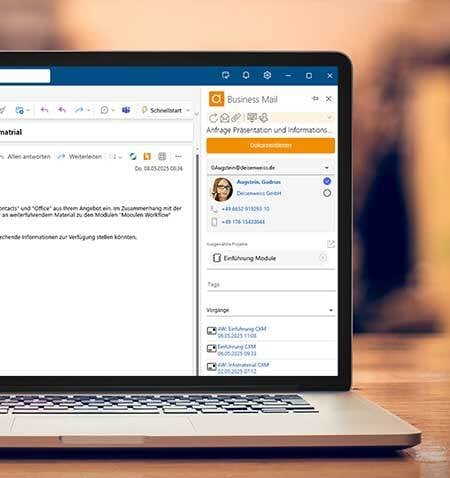
Your Outlook now with integrated CRM file
How it works
Business Mail integrates the CRM file into your Outlook client. The Outlook-CRM integration ensures seamless workflows: You can see right from your inbox whether the sender is listed in your CRM system. All contact details and current activities are displayed and can be opened with a single click. This keeps you fully informed at unprecedented speed. With a single click, you can automatically add the new email to the CRM customer file. Your team won’t miss a thing.
Customer management is a breeze with Outlook
CRM with Outlook
Is the email sender not yet in the CRM system? With just one click, the Business Mail Outlook plugin extracts all key sender information from the email and suggests a company record with a contact person. A quick glance is all it takes to create new contacts; with another click, you can assign the new email and save yourself a lot of typing. No other system offers this level of integration.
Avoid typical mistakes when implementing your CRM!
Free E-Book
Learn what really matters when implementing a CRM. With our free e-book, you’ll quickly get a comprehensive overview, be able to plan more effectively, and avoid and avoid typical mistakes during CRM implementation!